Touch, keys or controller.
Vehicle-specific touch buttons on iPhone and iPad, keyboard controls on Mac and compatible game controllers. On Apple TV, play with the Siri Remote or a controller; map editing requires a controller.
 FLAGFALL
iPHONE · iPAD · MAC · APPLE TV / IN DEVELOPMENT
Capture-the-flag vehicle combat for iPhone, iPad, Mac and Apple TV. Four vehicles. Island battlegrounds. One very important getaway.
Real game. Real captures. Straight from the simulator.
Tank / Break through the island defences.
01 / 06Development build · Staged scenes running in the real game · Click any screen to inspect.
01 / THE MISSION
Break open enemy flag buildings until the hidden flag is revealed. Collect it with a jeep, then bring it back to your landing pad.
Keep an eye on fuel, ammunition and your vehicle stock. Refill at depots, return vehicles to your bunker, and keep a jeep alive for the getaway.
02 / PICK YOUR APPROACH
Different vehicles.
Different ways through.
THE GETAWAY
Fast, fragile and the only vehicle that can carry the flag. Deploy its floats to cross deep water, then bring the prize back to your landing pad.
Jeep / Flag carrierActual simulator captures, with the game’s HUD intact. Scenes use the app’s built-in screenshot staging; final gameplay may change.
03 / FIND YOUR FIGHT
Pick your setup.
See what you’ll need.
100 ISLANDS · 9 LEVELS
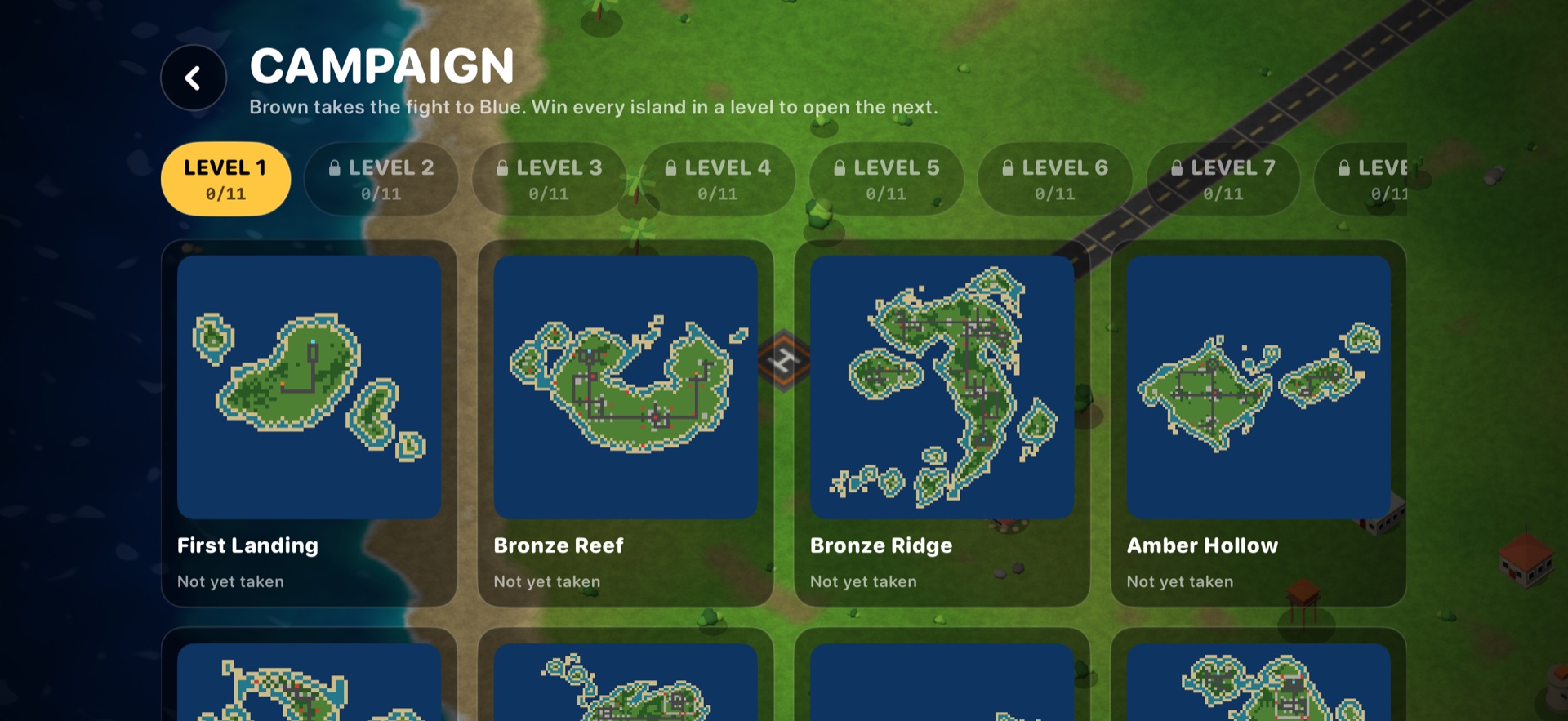
Work through 100 campaign islands and chase your best times. Or jump into Skirmish: generated islands, any bundled map without campaign locks, and your own creations. Skirmish wins leave campaign progress unchanged.
Your setup: iPhone, iPad, Mac or Apple TV. A guided tutorial helps you learn the ropes.
YOUR NEXT MISSION
Touch, Pencil, mouse or controller. Explore the editor, My Maps and sharing.
Map editor guide →COMPETELocal split-screen or Game Center online play. Find the setup that suits you.
Multiplayer guide →WATCHTank firepower, helicopter flight, a jeep flag pickup and two-player action.
Watch the gameplay teaser →New in development build 28: Skirmish, five generated island styles, mobile editing, Apple Pencil controls, map sharing and iCloud Drive maps. Footage shows an earlier development build.
SET THE TEMPO
Three difficulty settings change how the island’s defences fight back. Explore the differences before you launch.
A balanced fight: slower towers, reduced damage and fewer drones.
Feature guide, not a playable demo. In online matches, the host’s difficulty is used.
04 / BUILD YOUR OWN BATTLEGROUND
Start with a blank ocean or a generated island. Paint terrain, place defences and launch pads, then jump straight into a playtest.
Draw roads, walls and bridges in a stroke. Paint with touch or Apple Pencil on compatible iPads, use a mouse on Mac, or edit with a controller. Save to My Maps, rename your island and share map files on iPhone, iPad and Mac.
iPhone · iPad · Mac · Apple TV with a controllerPaint land, water and roads to build your island.
Place structures, choose their side and facing, and add launch pads.
Check playability, test your route and save it to My Maps. iCloud Drive keeps maps available across iPhone, iPad and Mac when enabled.
05 / AT YOUR CONTROLS
Vehicle-specific touch buttons on iPhone and iPad, keyboard controls on Mac and compatible game controllers. On Apple TV, play with the Siri Remote or a controller; map editing requires a controller.
Wins and best times save locally, with iCloud progress sync when available. Come back to your campaign and chase a better time.
Experimental fold-aware layouts separate the playfield from touch controls in tabletop view and adapt to larger screens. Device support is still being validated.
NEXT STOP: THE ISLANDS
In development for iPhone, iPad, Mac and Apple TV. Release date and download links will be announced here when ready.
Free to download. Every feature included.
Planned: advertising, with one lifetime purchase to remove all ads.
BEFORE YOU PLAY
Yes. The gameplay and campaign screens were captured on 25 October 2026 from a fresh build running in local iPhone and iPad simulators. The app’s screenshot scenes stage the action and run scripted input. We have kept the game imagery and HUD intact; the app icon is branding artwork.
Yes. Create and playtest on iPhone, iPad and Mac, or Apple TV with a controller. My Maps on iPhone, iPad and Mac supports import, rename and sharing through system sharing options. iCloud Drive storage is available on those platforms, with local storage when iCloud is unavailable. Apple TV stores maps locally. There is no public map workshop.
On Mac, use a shared keyboard or controllers for local split-screen. Large iOS screens can show touch controls for each player; smaller phones need two controllers. Online play uses Game Center and matching game builds. The split-screen capture here shows local play, not an online session.
FlagFall is still in development. Release and download details will be added here when available. All features will be free; a single lifetime purchase is planned to remove advertising.